Customize the Columns to be Displayed in the Settle and Checkout Tab
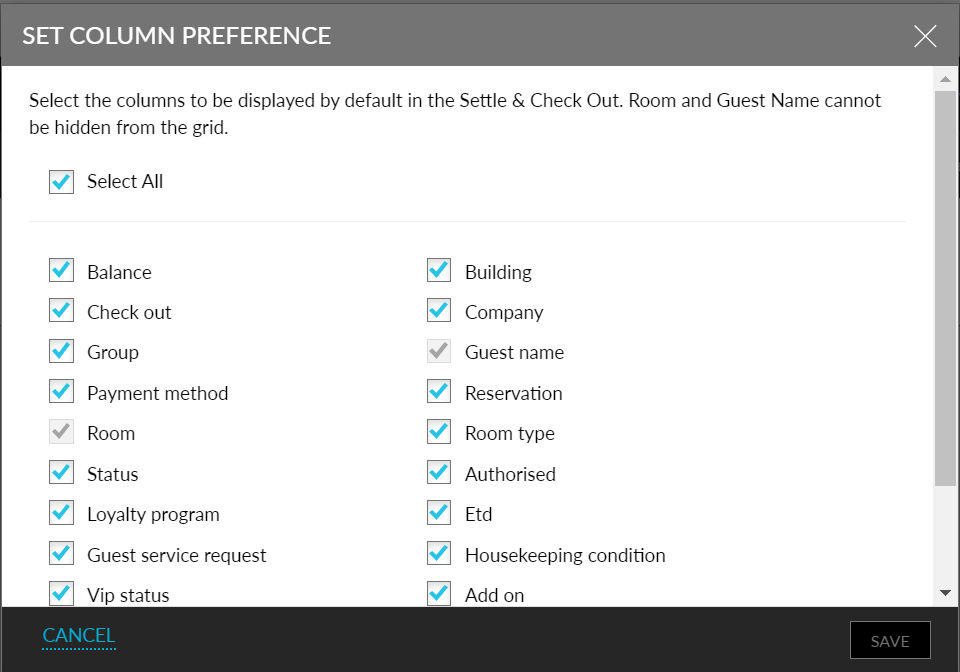
Stay is enhanced to allow users to customize the columns to be displayed in the Settle and Checkout tab of the Batch Operations screen. Users can enable or disable the columns to be displayed. The preferences are configured at the property level and not user-specific, that is, the preferences configured by one user are displayed to all the other users in the property.
To support this enhancement, a new button, More, is added to the Settle and Checkout tab of the Batch Operations screen. When clicked, the new option, Set Column Preference, is displayed. On clicking this option, the Set Column Preference screen is displayed with the following columns:
-
Reservation
-
Room Type
-
Room - This column is enabled and selected by default.
-
Guest Name - This column is enabled and selected by default.
-
Group
-
Company
-
Payment Method
-
Balance
-
Checkout
-
Status
-
Building
-
Housekeeping Condition (selected by default)
-
ETD (selected by default) - This column is available for selection only when the Estimated Time of Arrival/Departure feature setting is enabled.
-
Add-on
-
Loyalty Program
-
VIP Status
-
Guest Service Request
-
Authorized (selected by default)